
9 Ways to Tell if a Video Went Viral Thanks to AI
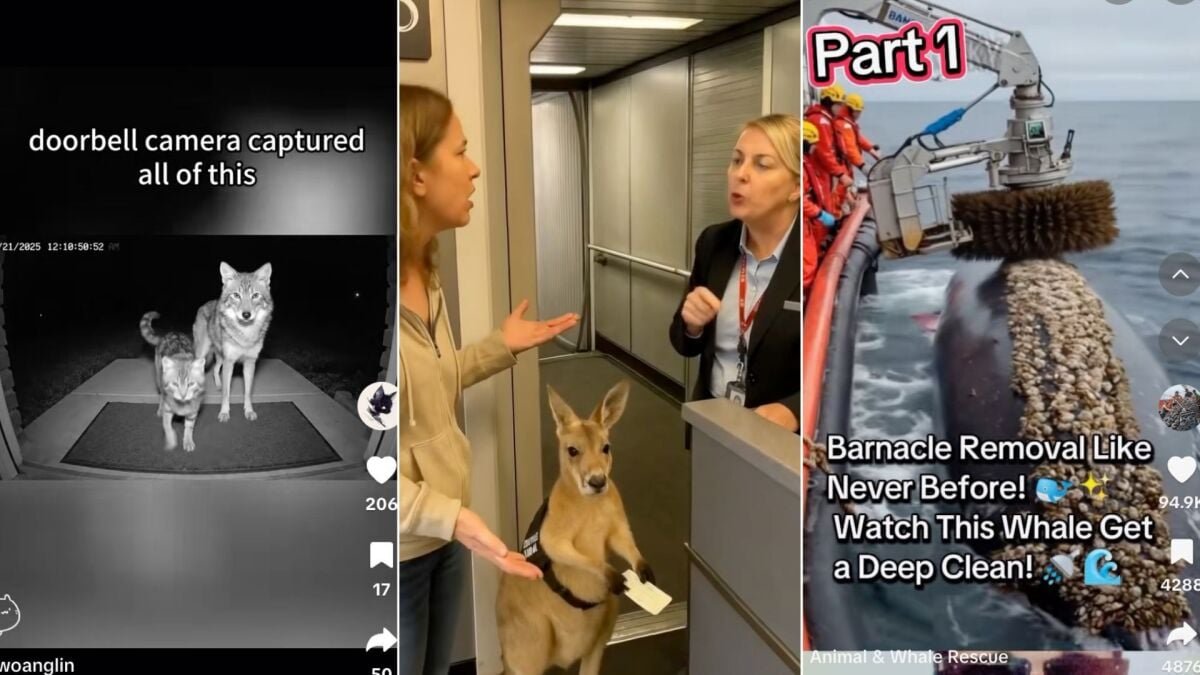
AI-generated video has become incredibly realistic, to the point where it’s hard to distinguish what’s real from what’s not. Platforms like TikTok, Shorts, and Reels are filled with viral clips of impossibly cute animals and other perfect scenarios, leaving viewers questioning the authenticity of what they see.
The technology behind these ultra-realistic AI videos has advanced significantly, with tools like OpenAI’s Sora and Google Veo 3 capable of generating professional-grade content with intricate details like complex camera movements and believable textures. This blurring between human-shot footage and AI-generated content makes it challenging to spot the “tells” that give away the artificial nature of these videos.
One example is a video of bunnies bouncing in perfect rhythm, which, while adorable, raises suspicions upon closer inspection. To help identify AI-generated viral videos, here are some tips to keep in mind:
1. Look at the context first: Many AI videos are staged in specific scenarios, often using dark filters to hide glitches and inconsistencies commonly found in AI footage.
2. Check for missing device hallmarks: If the video claims to be from a security feed, look for timestamps, logos, and interface overlays. The absence of these can be a red flag, but their presence doesn’t guarantee the video’s authenticity.
3. Watch the physics: Real-world motion follows real-world rules, so pay attention to details like animals executing perfectly timed jumps or unrealistic interactions between objects.
Ultimately, while AI-generated videos may be entertaining and visually impressive, a keen eye for detail and a healthy dose of skepticism can help viewers differentiate between what’s real and what’s artificially generated.
Whale clean with Machinery #rescue #OceanWildlife #DeepSeaCreatures #SaveTheWhales #big #DolphinLovers #SaveTheOcean #seahorse #ship #barnacles #SeaGiants #WhaleWatching #OceanVibes #animals #animalsoftiktok #reacuedog #DolphinRescue
♬ original sound – Life Saviours
4. Mind the runtime
Shorter clips give AI less opportunity to reveal its flaws. That’s why so many viral synthetic videos cut off right before something looks “off.”
“If the video is 10 seconds long, be suspicious. There’s a reason why it’s short,” Hany Farid, a UC Berkeley professor of computer science and digital forensics expert, said to Mashable.
Likewise, if a longer video is made up of very short clips stitched together, be suspicious. Most AI video generators can only produce short clips. Google Veo 3, the most advanced generative AI video model, produces 8-second clips. Sora, by ChatGPT-maker OpenAI, produces videos between one and 20 seconds long.
5. Listen for sound (or the lack of it)
Synthetic clips often have strangely clean audio, mismatched ambient noise, or none at all. “Fabrication coming from them, distorting certain facts…that’s really hard to disprove,” Aruna Sankaranarayanan, a research assistant at MIT’s Computer Science and Artificial Intelligence Laboratory, said to Mashable. Silent or overly clean soundscapes can be a big clue.
- How to identify AI-generated text
- How to identify AI-generated images
6. Spot AI-text artifacts
AI still struggles with legible writing. Check clothing, signage, or packaging in the frame — warped letters, random symbols, or gibberish text are persistent giveaways. “If the image feels like clickbait, it is clickbait,” Farid said to Mashable.
For example, this viral video of an emotional support kangaroo. Look closely at its vest as the video zooms in.
Emotional support kangaroo rejected entry to plane. 😭😭 #fyp #viral #fypage #fypage #fypシ #wendyortiz #fypシ゚viral
7. Watch for impossible movements
Humans and animals have subtle weight shifts, irregular gait patterns, and micro-movements. AI creations often lack these subtleties. And if you look closely, you can often spot bizarre inconsistencies, such as multiple figures melting into one, or vice versa.
“The building added a story, or the car changed colors, things that are physically not possible,” Farid said to Mashable, describing temporal inconsistencies.
8. Look for (or notice the absence of) watermarks
Some AI video generators — including Sora and Veo 3 — automatically embed watermarks or metadata to identify synthetic content. These marks can appear in corners, as faint overlays, or as hidden digital signatures in the file. While digital watermarks like SynthID from Google DeepMind are promising, watermarks can also be removed or cropped out of viral videos.
9. Check the account’s history
AI Videos Flood Social Media
Many AI videos are churned out en masse by AI slop farmers. If you see a video that seems off, check the account behind the video. Often, you’ll find they’ve posted dozens — or even hundreds — of nearly identical AI videos in a short period of time. That’s a big red flag that the video you just watched was generated by AI.
Topics Discussed
Topics
Artificial Intelligence
Social Media